xray下载
https://github.com/chaitin/xray/releases
下载指定操作系统的xray即可
终端首次执行命令会在同一目录下生成congfig.yaml配置文件
如果有license证书,将其命名为xray-license.lic放到和xray同一个目录即可使用高级版
官方参考文档
xray配置文件
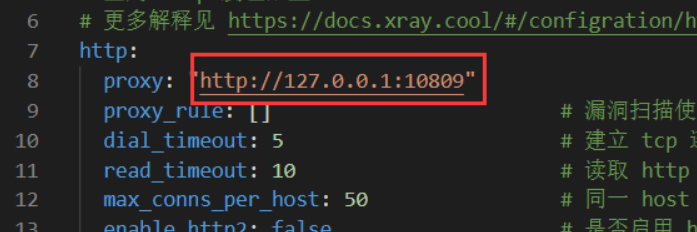
1.配置扫描时的代理
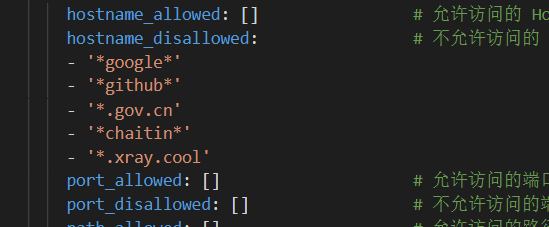
2.配置爬虫禁止的域名
3. 配置cookie( 登录用户)

xray命令
在终端下输入xray_windows_amd64.exe --help
COMMANDS:
     webscan, ws      Run a webscan task
     servicescan, ss  Run a service scan task
     subdomain, sd    Run a subdomain task
     poclint, pl      lint yaml poc
     reverse          Run a standalone reverse server
     convert          convert results from json to html or from html to json
     genca            GenerateToFile CA certificate and key
     upgrade          check new version and upgrade self if any updates found
     version          Show version info
     help, h          Shows a list of commands or help for one command

GLOBAL OPTIONS:
   --config FILE      Load configuration from FILE (default: "config.yaml")
   --log-level value  Log level, choices are debug, info, warn, error, fatal
   --help, -h         show help
1. subdomain 子域名扫描
查看帮助: xray_windows_amd64.exe subdomain --help
OPTIONS:
   --target value, -t value  指定扫描目标
   --no-brute                禁用子域名爆破
   --web-only                筛选出带有web服务的域名
   --ip-only                 筛选能成功解析ip的域名
   --json-output FILE        output xray results to FILE in json format
   --html-output FILE        output xray result to FILE in HTML format
   --text-output FILE        output xray results to FILE in plain text format
   --webhook-output value    将结果以json格式发送到一个地址(webhook)
扫描web服务并将其输出到txt文件
#扫描web服务并将其输出到txt文件
xray_windows_amd64.exe subdomain -t xxx.xxx.xxx --no-brute --web-only --ip-only --text-output xxx.txt
输出格式为 域名,ip地址,在linux下可以使用awk筛选出域名/ip
# 输出域名
cat xxx.txt | awk -F , '{print $1}' >> result_dm.txt
# 输出ip ,可用于进一步C段扫描
cat xxx.txt | awk -F , '{print $2}' >> result_ip.txt
2. webscan web漏洞扫描
查看帮助:xray_windows_amd64.exe webscan --help
OPTIONS:
   --list, -l                                     列出可用插件
   --plugins value, --plugin value, --plug value  指定插件, 多个插件使用 ',' 分割
   --poc value, -p value                          指定POC,多个POC使用',' 分割

   --listen value                                 监听指定端口,收集流量进行扫描,非常适合集合多个工具进行自动化扫描,value的值为地址, (example: 127.0.0.1:1111)
   --basic-crawler value, --basic value           use a basic spider to crawl the target and scan the requests
   --browser-crawler value, --browser value       use a browser spider to crawl the target and scan the requests
   --url-file value, --uf value                   从文件中获取url进行扫描(可用subdomain收集的结果,注意需要将结果中的ip和域名分离出来)
   --burp-file value, --bf value                  read requests from burpsuite exported file as targets
   --url value, -u value                          扫描单个url
   --data value, -d value                         data string to be sent through POST (e.g. 'username=admin')
   --raw-request FILE, --rr FILE                  load http raw request from a FILE
   --force-ssl, --fs                              force usage of SSL/HTTPS for raw-request

   --json-output FILE, --jo FILE                  output xray results to FILE in json format
   --html-output FILE, --ho FILE                  output xray result to FILE in HTML format
   --webhook-output value, --wo value             post xray result to url in json format
示例扫描命令
# 扫描单个url
xray_windows_amd64.exe webscan --browser-crawler --url  xxx.xxx.com --html-output 1.html
# 指定url文件进行扫描
xray_windows_amd64.exe webscan --browser-crawler --url-file result.txt --html-output 1.html
一个简单的脚本(linux)
#! /bin/bash
TARGET="$1"
./xray_linux_amd64 subdomain -t $TARGET --no-brute --web-only --ip-only --text-output $TARGET.txt
cat $TARGET.txt | awk -F , '{print $1}' >> $TARGET.domain.txt
rm -rf $TARGET.txt
./xray_linux_amd64 webscan --url-file $TARGET.domain.txt --html-output $TARGET.html
放在和xray同一目录下运行即可 如: ./test.sh www.xxx.com
结合浏览器进行扫描
- 浏览器安装证书https://www.liuyixiang.com/post/109546.html
- xray运行监听端口xray_windows_amd64.exe ws –listen 127.0.0.1:7777 –html-output 1.html
- 浏览器配置代理为127.0.0.1:7777
- 访问网页即可自动扫描
结合burpsuite进行扫描
https://blog.csdn.net/wy_97/article/details/105656097
3. servicescan 端口服务扫描
查看帮助:xray_windows_amd64.exe servicescan --help
OPTIONS:
   --target value, -t value            specify the target, for example: host:8009
   --target-file value, --tf value     load targets from a local file, one target a line
   --json-output FILE, --jo FILE       output xray results to FILE in json format
   --webhook-output value, --wo value  post xray result to url in json format
   --html-output FILE, --ho FILE       output xray result to FILE in HTML format
插件使用 & 开发
转载请注明来源,欢迎对文章中的引用来源进行考证,欢迎指出任何有错误或不够清晰的表达。可以在下面评论区评论,也可以邮件至 1944270374@qq.com