工具介绍
FreeMarker 是一款 模板引擎: 即一种基于模板和要改变的数据, 并用来生成输出文本(HTML网页,电子邮件,配置文件,源代码等)的通用工具。 它不是面向最终用户的,而是一个Java类库,是一款程序员可以嵌入他们所开发产品的组件。
模板编写为FreeMarker Template Language (FTL)。它是简单的,专用的语言, 不是 像PHP那样成熟的编程语言。 那就意味着要准备数据在真实编程语言中来显示,比如数据库查询和业务运算, 之后模板显示已经准备好的数据。在模板中,你可以专注于如何展现数据, 而在模板之外可以专注于要展示什么数据。
通过freemarker ,可以向word模板中填入数据,个人看上它最主要的原因是可以循环插入。
比如有的需求是需要插入多张图片、多个列表等,对于这种不确定的, 可以使用<#list> 标签,将需要循环的部分括起来,插入时只需要传入数组元素即可生成。
环境配置
maven引入
    <dependency>
      <groupId>e-iceblue</groupId>
      <artifactId>spire.doc.free</artifactId>
      <version>3.9.0</version>
    </dependency>
    <dependency>
      <groupId>org.freemarker</groupId>
      <artifactId>freemarker</artifactId>
      <version>2.3.20</version>
    </dependency>
spire需要引入源
    <repository>
      <id>com.e-iceblue</id>
      <name>e-iceblue</name>
      <url>http://repo.e-iceblue.com/nexus/content/groups/public/</url>
    </repository>
使用流程
生成模板文件
首先设计一个docx模板,并在要填入数据的地方写入占位符,需要写入图片的地方随便放一张图片即可
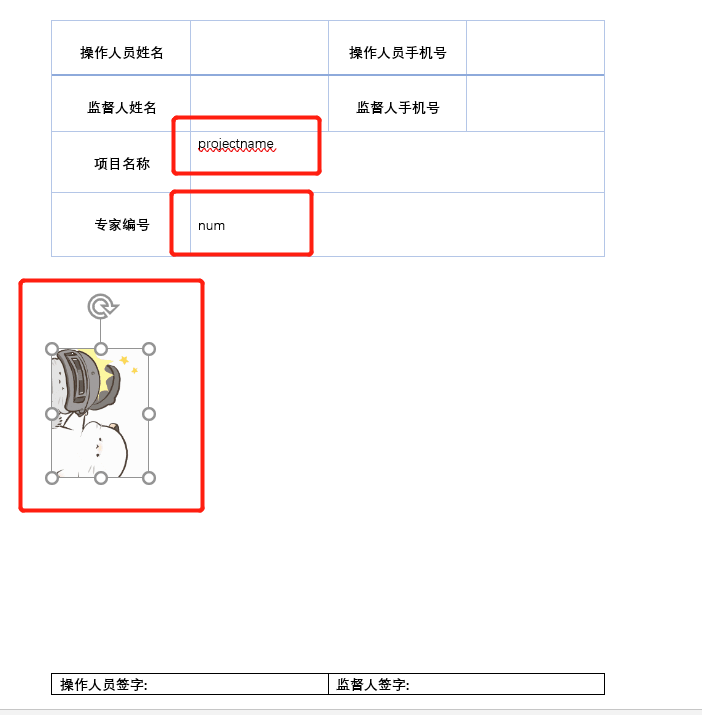
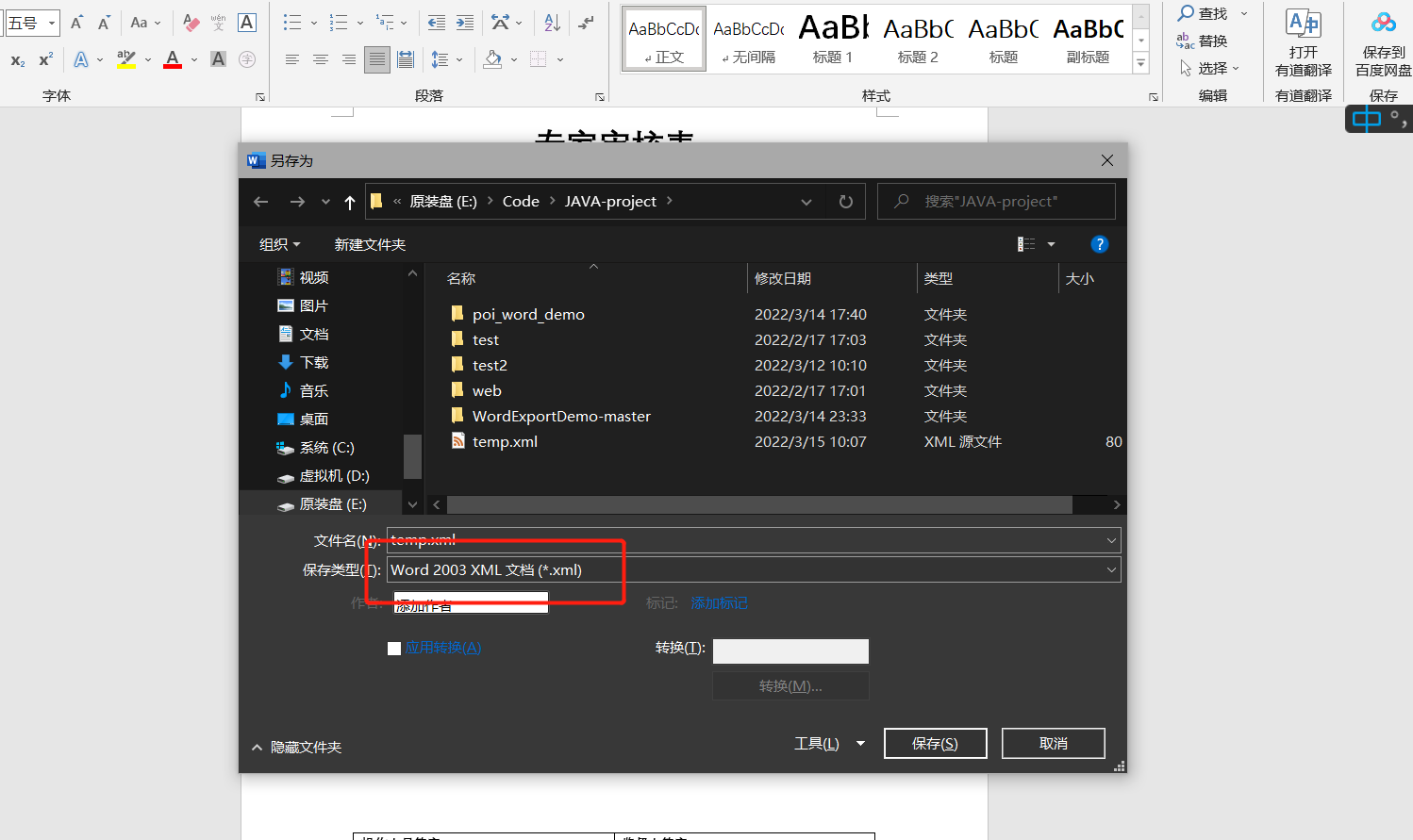
按F12 ,将其保存为word2003 xml 格式
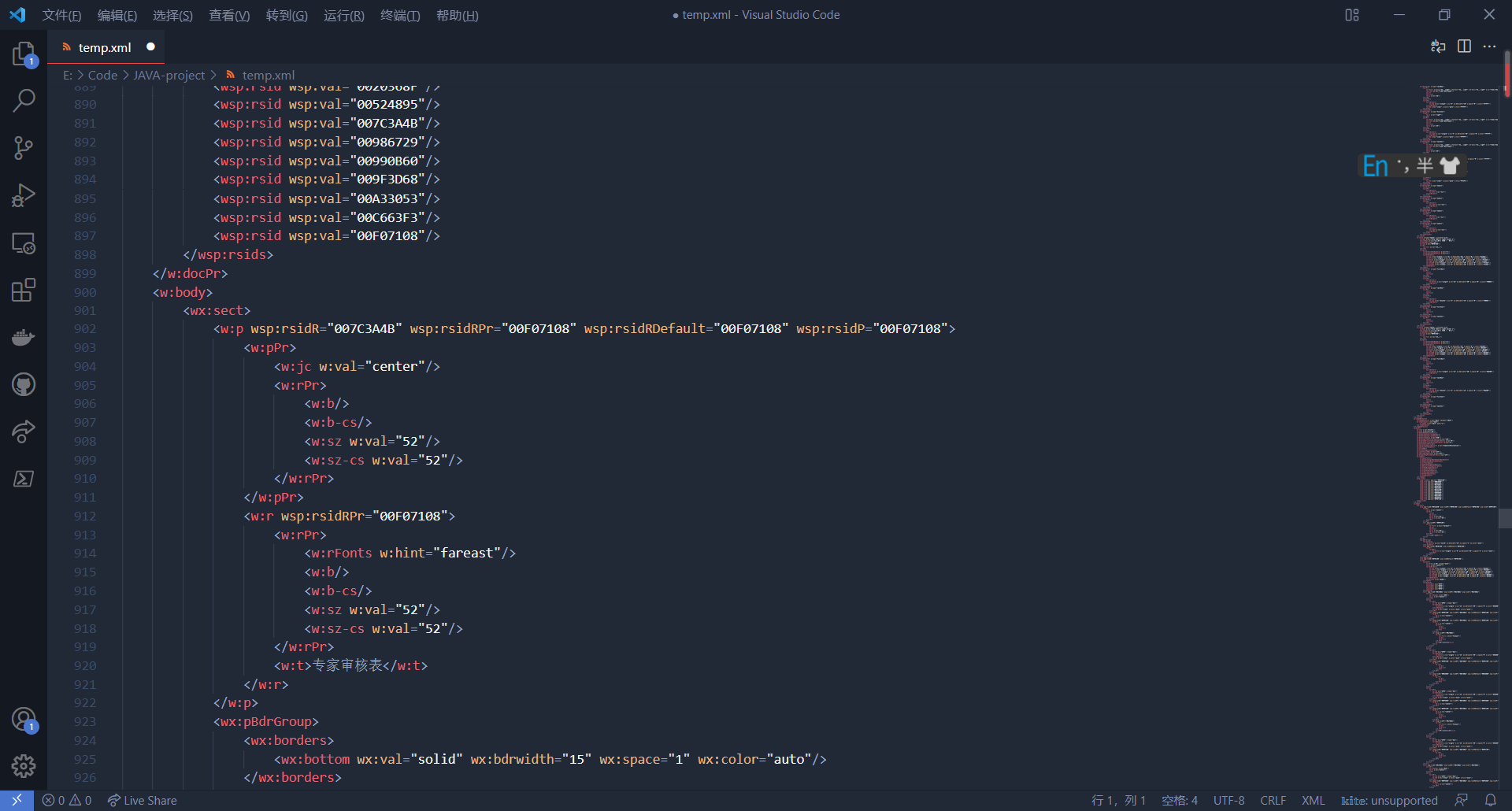
通过vscode打开,alt+shift+F格式化一下方便修改(注意: 经测试,模板文件中不能有tab键,格式化之后有tab键,因此编写完成后需要把这些tab键都删除,不然生成的word图片会无法显示)
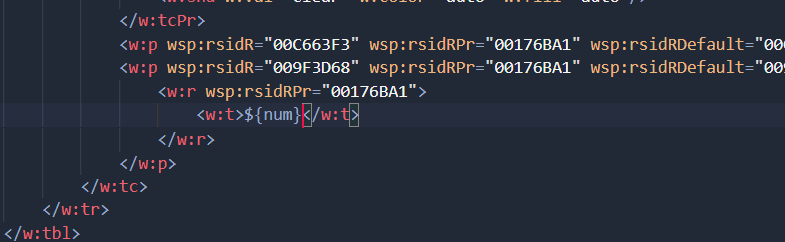
对于写好占位符的地方,要为其加上${} ,一开始不加上是因为word生成的xml会将${占位符}分成三份,在xml里直接修改不容易出错。
图片的数据信息在binData中,以base64格式存放,单一的图片也跟上面的差不多,将binData的数据修改成占位符即可,多图片时就需要使用循环了,主要修改六个地方,分别是加入循环、在binData中加入占位符,在shape中加上图片的宽和高,在文件名处加入占位符。
补充: 在list循环中,若对象为自定义类 ,可通过一个 .获取对应的值
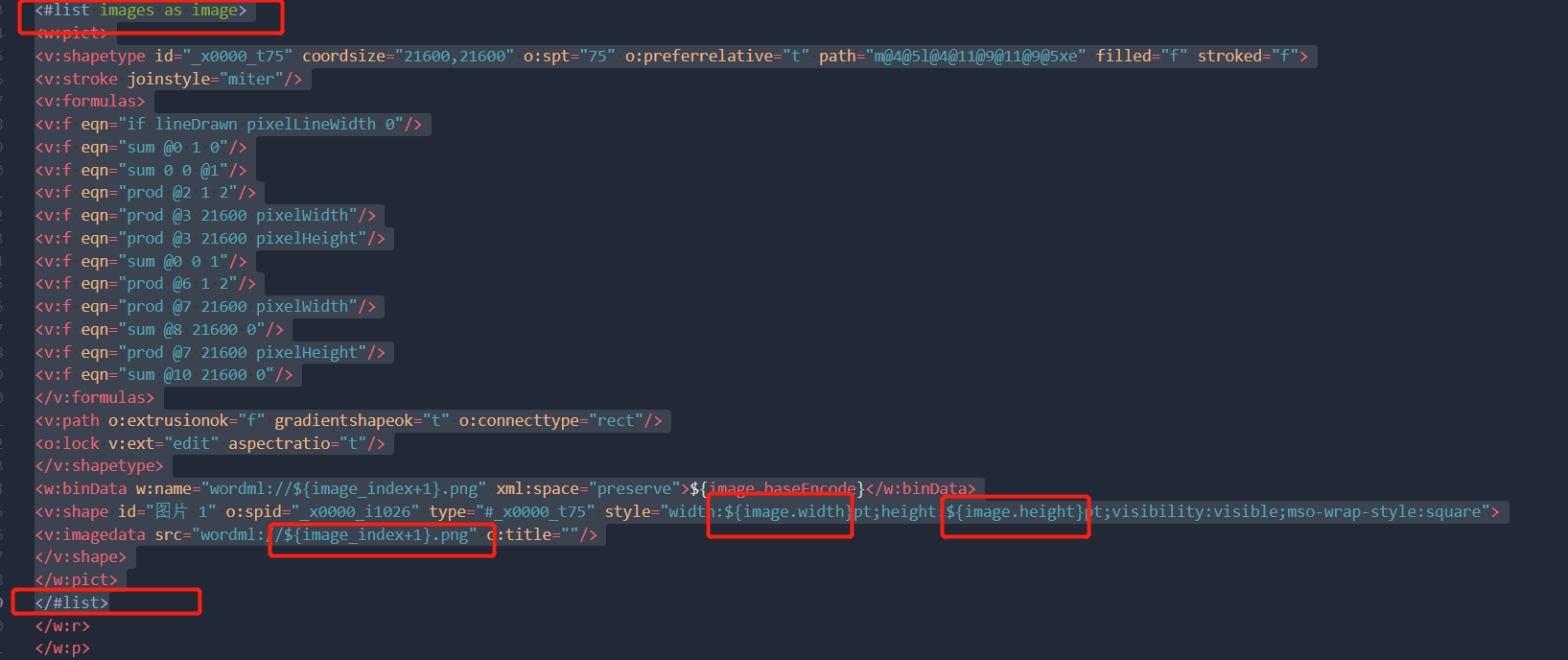
模板如下,可直接使用
<#list images as image>
<w:pict>
<v:shapetype id="_x0000_t75" coordsize="21600,21600" o:spt="75" o:preferrelative="t" path="m@4@5l@4@11@9@11@9@5xe" filled="f" stroked="f">
<v:stroke joinstyle="miter"/>
<v:formulas>
<v:f eqn="if lineDrawn pixelLineWidth 0"/>
<v:f eqn="sum @0 1 0"/>
<v:f eqn="sum 0 0 @1"/>
<v:f eqn="prod @2 1 2"/>
<v:f eqn="prod @3 21600 pixelWidth"/>
<v:f eqn="prod @3 21600 pixelHeight"/>
<v:f eqn="sum @0 0 1"/>
<v:f eqn="prod @6 1 2"/>
<v:f eqn="prod @7 21600 pixelWidth"/>
<v:f eqn="sum @8 21600 0"/>
<v:f eqn="prod @7 21600 pixelHeight"/>
<v:f eqn="sum @10 21600 0"/>
</v:formulas>
<v:path o:extrusionok="f" gradientshapeok="t" o:connecttype="rect"/>
<o:lock v:ext="edit" aspectratio="t"/>
</v:shapetype>
<w:binData w:name="wordml://${image_index+1}.png" xml:space="preserve">${image.baseEncode}</w:binData>
<v:shape id="图片 1" o:spid="_x0000_i1026" type="#_x0000_t75" style="width:${image.width}pt;height:${image.height}pt;visibility:visible;mso-wrap-style:square">
<v:imagedata src="wordml://${image_index+1}.png" o:title=""/>
</v:shape>
</w:pict>
</#list>
编写完成后别忘了删除tab键
    public static String getPath(String userpath){
        String path="";
        String os = System.getProperty("os.name");
        if (os.toLowerCase().startsWith("win")) {
            path = "E:"+ File.separator+userpath+File.separator;
        }else {
            path = "/webapps/img/"+userpath+"/";
        }
        return path;
    }
代码介绍
图片相关
因为循环图片中,需要用到图片的高宽、base64编码的信息,因此这里创建一个类记录图片信息
package org.qwrdxer.pojo;

public class Imagebase64 {
    private Integer width;    //宽
    private Integer height;    //高
    private String baseEncode;  //base64编码后的数据

    public Integer getWidth() {
        return width;
    }

    public void setWidth(Integer width) {
        this.width = width;
    }

    public Integer getHeight() {
        return height;
    }

    public void setHeight(Integer height) {
        this.height = height;
    }

    public String getBaseEncode() {
        return baseEncode;
    }

    public void setBaseEncode(String baseEncode) {
        this.baseEncode = baseEncode;
    }
}
生成word 、图片base64数据获取
package org.qwrdxer.utils;

import freemarker.template.Configuration;
import freemarker.template.Template;
import sun.misc.BASE64Encoder;

import java.io.*;
import java.util.Map;

public class GenWord {

    /**
     * 生成word文件
     *
     * @param dataMap      数据
     * @param templateName 模板名称
     * @param file         文件
     * @param fileName     文件名称
     */
    public static void createWord(Map<String, Object> dataMap, String templateName, File file, String fileName) {
        try {
            Configuration configuration = new Configuration();
            configuration.setDefaultEncoding("UTF-8");
            configuration.setDirectoryForTemplateLoading(file);
            Template template = configuration.getTemplate(templateName);
            File outFile = new File("E:\\87b0767d5d8f49039fac2b1d1e29fdc3\\" + fileName);
            if (!outFile.getParentFile().exists()) {
                outFile.getParentFile().mkdirs();
            }
            Writer out = new BufferedWriter(new OutputStreamWriter(new FileOutputStream(outFile), "UTF-8"));
            template.process(dataMap, out);
            out.flush();
            out.close();
        } catch (Exception e) {
            e.printStackTrace();
        }
    }

    public static String convertFileToBase64(String imgPath) throws IOException {
        InputStream in = new FileInputStream(imgPath);
        ByteArrayOutputStream outputStream = new ByteArrayOutputStream();
        // 将内容读取内存中
        byte[] buffer = null;
        buffer = new byte[1024];
        int len = -1;
        while ((len = in.read(buffer)) != -1) {
            outputStream.write(buffer, 0, len);
        }
        buffer = outputStream.toByteArray();

        if (in != null) {
            try {
                // 关闭inputStream流
                in.close();
            } catch (IOException e) {
                e.printStackTrace();
            }
        }
        if (outputStream != null) {
            try {
                // 关闭outputStream流
                outputStream.close();
            } catch (IOException e) {
                e.printStackTrace();
            }
        }
            // 对字节数组Base64编码
            return new BASE64Encoder().encode(buffer);

    }
}
createWord 函数用于根据模板将数据填入,并输出到指定文件
参数为:
- 要填入模板中的数据 Map
- 模板名字 String
- 模板所在文件夹 File
- 输出文件的路径+名字 String
convertFileToBase64函数,将图片数据转换成base64, 输入为图片所在路径
测试代码
    @Test
    public void test3() throws IOException, TemplateException {
        Map<String, Object> dataMap = new HashMap<>();
        dataMap.put("num","1,23,,3,4,54,435,345,345");
        dataMap.put("opphone","12131313");
        dataMap.put("opname","WDADWWD");
        File picture=null;
        BufferedImage sourceImg=null;
        List<Imagebase64> images = new ArrayList<Imagebase64>();
        File file = new File("E:\\49f3cd0e6ef34ba1bdf5ecdb11defbf1");        //获取其file对象
        File[] fs = file.listFiles();    //遍历path下的文件和目录,放在File数组中
        for(File f:fs){                    //遍历File[]数组
            if((!f.getName().contains("doc")) && (!f.getName().contains("pdf"))){
                //若非目录(即文件),则打印
                System.out.println(f.getPath());
                picture = new File(f.getPath());
                sourceImg = ImageIO.read(new FileInputStream(picture));
                Imagebase64 image=new Imagebase64();
                int tmpwidth=sourceImg.getWidth();
                int tmpheight=sourceImg.getHeight();
                if(tmpwidth>400) {
                    int tmprate=tmpwidth/400;
                    tmpwidth=(tmpwidth / tmprate);
                    tmpheight=(tmpheight / tmprate);
                }
                if(tmpheight>400){
                    int tmprate=tmpheight/300;
                    tmpheight=(tmpheight / tmprate);
                    tmpwidth=(tmpwidth / tmprate);
                }
                image.setWidth(tmpwidth);
                image.setHeight(tmpheight);
                image.setBaseEncode(convertFileToBase64(f.getPath()));
                //images.add(convertFileToBase64(f.getPath()));
                images.add(image);
            }

        }
        dataMap.put("images",images);
        dataMap.put("total","111");
        dataMap.put("need","11");
        createWord(dataMap,"temp.ftl",new File("E:\\"),"E:\\49f3cd0e6ef34ba1bdf5ecdb11defbf1\\out.doc");
    }
- 首先我们需要定义一个map,用于记录生成word需要的信息。
- map的key设置为 模板中的占位符,值为字符串或列表形式(列表用于循环)
- 主要是对图片的处理,经测试若图片太大,会导致生成的图片无法在word中显示,因此设置图片的宽和高,若超过某个阈值,则进行一定倍数的缩小。
补充: 将word转成PDF
主要是使用 aspose-words 破解版,将 word转换成PDF
word转pdf
https://blog.csdn.net/weixin_49051190/article/details/110140154
https://www.cnblogs.com/jssj/p/11808161.html
https://blog.csdn.net/yinyanyao1747/article/details/90751024
Java Maven上指定包下载不下来问题解决
https://blog.csdn.net/u013419838/article/details/114446652
linux 报错
java.awt.AWTError: Assistive Technology not found: org.GNOME.Accessibility.AtkWrapper
https://blog.csdn.net/df1445/article/details/107943639
linux下成的pdf乱码,需要将window字体拷贝入linux
https://blog.csdn.net/blogliu/article/details/109049029
工具类
import com.aspose.words.License;
import com.aspose.words.SaveFormat;

import java.io.File;
import java.io.FileInputStream;
import java.io.FileOutputStream;
import java.io.InputStream;
import com.aspose.words.*;

import static org.qwrdxer.utils.Fileprocess.getabsPath;

public class word2pdf {
    /*****
     * 需要引入jar包:aspose-words-15.8.0-jdk16.jar
     */

    public static boolean getLicense() {
        boolean result = false;
        String Path=getabsPath();
        try {
            File file = new File(Path+"license.xml"); // 新建一个空白pdf文档
            InputStream is = new FileInputStream(file); // license.xml找个路径放即可。
            License aposeLic = new License();
            aposeLic.setLicense(is);
            result = true;
        } catch (Exception e) {
            e.printStackTrace();
        }
        return result;
    }

    public static void doc2pdf(String inPath, String outPath) {
        if (!getLicense()) { // 验证License 若不验证则转化出的pdf文档会有水印产生
            return;
        }
        try {
            long old = System.currentTimeMillis();
            File file = new File(outPath); // 新建一个空白pdf文档
            FileOutputStream os = new FileOutputStream(file);
            Document doc = new Document(inPath); // Address是将要被转化的word文档
            doc.save(os, SaveFormat.PDF);// 全面支持DOC, DOCX, OOXML, RTF HTML, OpenDocument, PDF,
            // EPUB, XPS, SWF 相互转换
            long now = System.currentTimeMillis();
            System.out.println("共耗时:" + ((now - old) / 1000.0) + "秒"); // 转化用时
        } catch (Exception e) {
            e.printStackTrace();
        }
    }
}
使用测试, 第一个参数为输入的word ,第二个参数为输出的pdf
doc2pdf("E:\\pdf22\\fro.doc","E:\\pdf22\\out.pdf");
参考文章
https://blog.csdn.net/xujiangdong1992/article/details/104616043
https://segmentfault.com/a/1190000038364182
https://www.cnblogs.com/h-java/p/10026850.html
转载请注明来源,欢迎对文章中的引用来源进行考证,欢迎指出任何有错误或不够清晰的表达。可以在下面评论区评论,也可以邮件至 1944270374@qq.com