AutoGen 是一个用于创建多代理 AI 应用程序的框架,这些应用程序可以自主运行或与人类一起工作。
Quick start
包安装
pip install -U "autogen-agentchat" "autogen-ext[openai]"
pip install -U "autogenstudio"  # GUI ,无代码编排的
Hello World
下面的代码创建了一个Agent并让其输出Hello World
import asyncio
from autogen_agentchat.agents import AssistantAgent
from autogen_ext.models.openai import OpenAIChatCompletionClient

async def main() -> None:
    agent = AssistantAgent("assistant", OpenAIChatCompletionClient(model="gpt-4o"))
    print(await agent.run(task="Say 'Hello World!'"))

asyncio.run(main())
协作
下面是一个例子,实现了用户输入问题,Agent进行联网搜索、资料整理的功能。
# pip install -U autogen-agentchat autogen-ext[openai,web-surfer]
# playwright install
import asyncio
from autogen_agentchat.agents import AssistantAgent, UserProxyAgent
from autogen_agentchat.conditions import TextMentionTermination
from autogen_agentchat.teams import RoundRobinGroupChat
from autogen_agentchat.ui import Console
from autogen_ext.models.openai import OpenAIChatCompletionClient
from autogen_ext.agents.web_surfer import MultimodalWebSurfer
async def main() -> None:
    model_client = OpenAIChatCompletionClient(model="gpt-4o",api_key="sk-De9thp9hKJIHto6O58A51019B0Ac4f0fAd019f00",base_url="https://api.v3.cm/v1")
    assistant = AssistantAgent("assistant", model_client)
    web_surfer = MultimodalWebSurfer("web_surfer", model_client)
    user_proxy = UserProxyAgent("user_proxy")
    termination = TextMentionTermination("exit") # Type 'exit' to end the conversation.
    team = RoundRobinGroupChat([web_surfer, assistant, user_proxy], termination_condition=termination)
    await Console(team.run_stream(task="帮我收集一下最近的multi agent相关信息,使用中文输出你的调查结果"))
asyncio.run(main())
生态系统
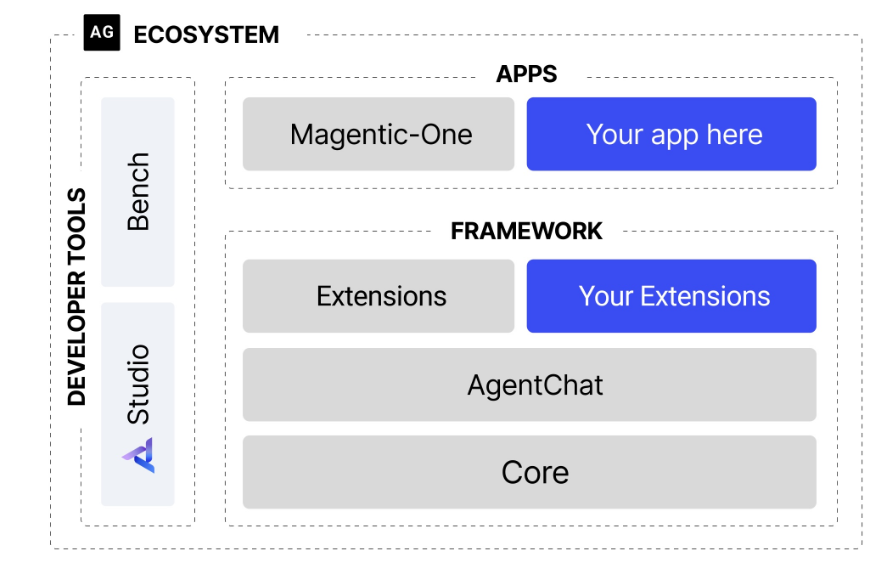
- Core API 实现了消息传递、事件驱动型Agent和本地/分布式 runtime
- AgentChat 实现了一个更简单的快速原型设计
- Extension API 支持第一方和第三方扩展,不断扩展框架功能。它支持客户端的特定LLM实现(例如 OpenAI、AzureOpenAI)和代码执行等功能。
- AutoGen Studio 提供用于构建多代理应用程序的无代码 GUI。
- AutoGen Bench 提供了用于评估代理性能的基准测试套件。
Agent Chat
Model
大模型是Agent的基础部分, autogen实现了许多模型的客户端供用户使用,这里使用OpenAIChatCompletionClient
首先需要安装额外的拓展包
pip install "autogen-ext[openai]"
通过提供apikey、模型名字、base url等信息来创建一个client ,通过调用客户端的Create方法调用大模型进行问题回答
from autogen_ext.models.openai import OpenAIChatCompletionClient
from autogen_core.models import UserMessage
import asyncio
model_client = OpenAIChatCompletionClient(model="gpt-4o",api_key="sk-De9thp9hKJIHto6O58A51019B0Ac4805843f5f0fAd019f00",base_url="https://api.v3.cm/v1")
async def main() -> None:
    result= await model_client.create([UserMessage(content="What is the capital of France?", source="user")])
    print(result)
    return
支持的model provider如下
- Openai
pip install "autogen-ext[openai]" - Azure Openai
pip install "autogen-ext[openai,azure]" - Azure AI Foundry
pip install "autogen-ext[azure]" - Ollama
- Gemini
- Semantic Kernel Adapter
pip install "autogen-ext[semantic-kernel-anthropic]"
Messages
总体来说,框架的Messages分为两类,一种是Agent与Agent之间的Message(交流),一种是单个Agent自己的内部事件和消息
Agent-Agent Message
AgentChat支持多种Agent之间交互的Message,他们属于联合类型ChatMessage
ChatMessage = Annotated[
    TextMessage | MultiModalMessage | StopMessage | ToolCallSummaryMessage | HandoffMessage, Field(discriminator="type")
]
示例如下:
from autogen_agentchat.messages import TextMessage,MultiModalMessage
from autogen_core import Image as AGImage
from PIL import Image
from io import BytesIO
text_message = TextMessage(content="Hello, world!", source="User")
pil_image = Image.open(BytesIO(requests.get("https://picsum.photos/300/200").content))
img = AGImage(pil_image) #封装成 框架的图片
multi_modal_message = MultiModalMessage(content=["Can you describe the content of this image?", img], source="User")#创建多模态消息
内部事件
AgentChat还支持 事件 的概念,它是一种Agent自身内部的消息。他们属于联合类型AgentEvent
AgentEvent = Annotated[

    ToolCallRequestEvent

    | ToolCallExecutionEvent

    | MemoryQueryEvent

    | UserInputRequestedEvent

    | ModelClientStreamingChunkEvent

    | ThoughtEvent,

    Field(discriminator="type"),

]
通常,事件由代理本身创建,并包含在从 on_messages 返回的 Response 的 inner_messages 字段中。
Agents
AutoGen 提供了一组预设的Agent,每个Agent的响应方式都有所不同,所有代理都共享以下属性和方法:
- name
- description
- on_messages() 向代理发送一系列ChatMessage并获取Response,值得注意的事Agent是有自身状态的, 调用此方法时只需要传入最新的消息
- on_messages_stram()
- on_reset() 将代理重置为其初始的状态
- run() & run_stream() 分别调用上述的发送消息方法,提供与Teams相同的接口的便捷方法
Assistant Agent
这是autogen的内置代理,它使用语言模型并具有使用工具的能力
from autogen_agentchat.agents import AssistantAgent
from autogen_agentchat.messages import TextMessage
from autogen_agentchat.ui import Console
from autogen_core import CancellationToken
from autogen_ext.models.openai import OpenAIChatCompletionClient
model_client = OpenAIChatCompletionClient(
    model="gpt-4o",
    # api_key="YOUR_API_KEY",
)
agent = AssistantAgent(
    name="assistant",
    model_client=model_client,
    tools=[web_search],
    system_message="Use tools to solve tasks.",
)
获取Agent的Response
async def assistant_run()->None:
    response=await agent.on_messages(
        [TextMessage(content="Find information on AutoGen", source="user")],
        cancellation_token=CancellationToken(),
    )
    print(response.inner_messages)
    print(response.chat_message)
    print(response)
response如下
Response(chat_message=ToolCallSummaryMessage(source='assistant', models_usage=None, metadata={}, content='AutoGen is a programming framework for building multi-agent applications.', type='ToolCallSummaryMessage'), inner_messages=[ToolCallRequestEvent(source='assistant', models_usage=RequestUsage(prompt_tokens=61, completion_tokens=15), metadata={}, content=[FunctionCall(id='call_4DjoBru0JY9r4v2NyNskYk4d', arguments='{"query":"AutoGen"}', name='web_search')], type='ToolCallRequestEvent'), ToolCallExecutionEvent(source='assistant', models_usage=None, metadata={}, content=[FunctionExecutionResult(content='AutoGen is a programming framework for building multi-agent applications.', name='web_search', call_id='call_4DjoBru0JY9r4v2NyNskYk4d', is_error=False)], type='ToolCallExecutionEvent')])
其中,chatMessage是Agent的最终响应
inner_messages是Agent内部的 “思考” 过程, 包含工具的请求调用以及工具的调用结果。
- on_message()将更新代理的内部状态,消息会被自动添加到代理的历史消息中
- 可以使用run()方法,返回TaskResult对象\
- 默认情况下,代理将返回工具调用的结果作为最终响应
多模态输入
from io import BytesIO

import PIL
import requests
from autogen_agentchat.messages import MultiModalMessage
from autogen_core import Image

# Create a multi-modal message with random image and text.
pil_image = PIL.Image.open(BytesIO(requests.get("https://picsum.photos/300/200").content))
img = Image(pil_image)
multi_modal_message = MultiModalMessage(content=["Can you describe the content of this image?", img], source="user")


async def assistant_run()->None:
    response = await agent.on_messages([multi_modal_message], CancellationToken())
    print(response.chat_message.content)
流式调用消息
我们还可以使用 on_messages_stream() 方法,然后使用 Console 打印显示在控制台中的消息。
Agent会逐条输出消息
async def assistant_run_stream() -> None:
    # Option 1: read each message from the stream (as shown in the previous example).
    # async for message in agent.on_messages_stream(
    #     [TextMessage(content="Find information on AutoGen", source="user")],
    #     cancellation_token=CancellationToken(),
    # ):
    #     print(message)

    # Option 2: use Console to print all messages as they appear.
    await Console(
        agent.on_messages_stream(
            [TextMessage(content="Find information on AutoGen", source="user")],
            cancellation_token=CancellationToken(),
        ),
        output_stats=True,  # Enable stats printing.
    )
流式Token生成
通过设置model_client_stream=True 来流式传输 Token
streaming_assistant = AssistantAgent(
    name="assistant",
    model_client=model_client,
    system_message="You are a helpful assistant.",
    model_client_stream=True,  # Enable streaming tokens.
)

# Use an async function and asyncio.run() in a script.
async for message in streaming_assistant.on_messages_stream(  # type: ignore
    [TextMessage(content="Name two cities in South America", source="user")],
    cancellation_token=CancellationToken(),
):
    print(message)
工具使用
LLM受限于只能输出文本响应, 无法与外部交互、无法获取实时数据等。 为了解决此类限制, 现在的LLM可以接受一系列可以使用的工具,并生成调用工具请求来拓展其自身能力。
这种能力称为 Tool Calling 或者Function Calling https://platform.openai.com/docs/guides/function-calling
- 在AgentChat中,
AssistantAgent可以使用工具来执行特定的动作. - 默认情况下,当
AssistantAgent执行工具时,会将工具执行结果作为最终结果返回chat_message=ToolCallSummaryMessage - 如果想让Agent进一步处理数据的话, 可以在构造AssistantAgent时设置 reflect_on_tool_use=True,让模型进行额外的处理。
- AssistantAgent调用一次会执行如下步骤: 一次模型调用、一次工具调用、 一次可选的模型反思,将最终结果返回。
内置工具
AutoGen Extension 提供了一组可与 Assistant Agent 一起使用的内置工具。 函数放置在autogen_ext.tools下
- code_execution
- graphrag 使用 GraphRAG 索引的工具。
- http 用于发出 HTTP 请求的工具。
- langchain 用于使用 LangChain 工具的适配器。
- mcp 用于使用模型聊天协议 (MCP) 服务器的工具。
- semantic_ernel
Function Tool
AssistantAgent 会自动将 Python 函数转换为 FunctionTool 该 Schema 可以被代理用作工具,并自动生成 Tool Schema 从函数签名和文档字符串中。
from autogen_core.tools import FunctionTool

# Define a tool using a Python function.
async def web_search_func(query: str) -> str:
    """Find information on the web"""
    return "AutoGen is a programming framework for building multi-agent applications."

# This step is automatically performed inside the AssistantAgent if the tool is a Python function.
web_search_function_tool = FunctionTool(web_search_func, description="Find information on the web")
# The schema is provided to the model during AssistantAgent's on_messages call.
web_search_function_tool.schema


{'name': 'web_search_func',
 'description': 'Find information on the web',
 'parameters': {'type': 'object',
  'properties': {'query': {'description': 'query',
    'title': 'Query',
    'type': 'string'}},
  'required': ['query'],
  'additionalProperties': False},
 'strict': False}
Model Context Protocol Tools
AssistantAgent 还可以使用使用 mcp_server_tools() 从模型上下文协议 (MCP) 服务器提供的工具。
pip install -U "autogen-ext[mcp]"
from autogen_agentchat.agents import AssistantAgent
from autogen_ext.models.openai import OpenAIChatCompletionClient
from autogen_ext.tools.mcp import StdioServerParams, mcp_server_tools

# Get the fetch tool from mcp-server-fetch.
fetch_mcp_server = StdioServerParams(command="uvx", args=["mcp-server-fetch"])
tools = await mcp_server_tools(fetch_mcp_server)

# Create an agent that can use the fetch tool.
model_client = OpenAIChatCompletionClient(model="gpt-4o")
agent = AssistantAgent(name="fetcher", model_client=model_client, tools=tools, reflect_on_tool_use=True)  # type: ignore

# Let the agent fetch the content of a URL and summarize it.
result = await agent.run(task="Summarize the content of https://en.wikipedia.org/wiki/Seattle")
Langchain Tools
您还可以通过将 Langchain 库中的工具包装在 LangChainToolAdapter 中来使用它们。
import pandas as pd
from autogen_ext.tools.langchain import LangChainToolAdapter
from langchain_experimental.tools.python.tool import PythonAstREPLTool

df = pd.read_csv("https://raw.githubusercontent.com/pandas-dev/pandas/main/doc/data/titanic.csv")
tool = LangChainToolAdapter(PythonAstREPLTool(locals={"df": df}))
model_client = OpenAIChatCompletionClient(model="gpt-4o")
agent = AssistantAgent(
    "assistant", tools=[tool], model_client=model_client, system_message="Use the `df` variable to access the dataset."
)
await Console(
    agent.on_messages_stream(
        [TextMessage(content="What's the average age of the passengers?", source="user")], CancellationToken()
    ),
    output_stats=True,
)
并行工具调用
某些模型支持并行工具调用,这对于需要同时调用多个工具的任务非常有用。默认情况下,如果模型客户端产生多个工具调用,则 AssistantAgent 将并行调用这些工具。 可以在初始化客户端时设置 parallel_tool_calls=True
结构化输出
结构化输出允许模型返回具有应用程序提供的预定义架构的结构化 JSON 文本。
from typing import Literal

from pydantic import BaseModel


# The response format for the agent as a Pydantic base model.
class AgentResponse(BaseModel):
    thoughts: str
    response: Literal["happy", "sad", "neutral"]


# Create an agent that uses the OpenAI GPT-4o model with the custom response format.
model_client = OpenAIChatCompletionClient(
    model="gpt-4o",
    response_format=AgentResponse,  # type: ignore
)
agent = AssistantAgent(
    "assistant",
    model_client=model_client,
    system_message="Categorize the input as happy, sad, or neutral following the JSON format.",
)

await Console(agent.run_stream(task="I am happy."))
模型的上下文(记忆)
通过model_context参数设置Agent的记忆管理方式
from autogen_core.model_context import BufferedChatCompletionContext

# Create an agent that uses only the last 5 messages in the context to generate responses.
agent = AssistantAgent(
    name="assistant",
    model_client=model_client,
    tools=[web_search],
    system_message="Use tools to solve tasks.",
    model_context=BufferedChatCompletionContext(buffer_size=5),  # Only use the last 5 messages in the context.
)
默认情况下,AssistantAgent 使用 UnboundedChatCompletionContext 它将完整的对话历史记录发送到模型。限制上下文 到最后 n 条消息,你可以使用 BufferedChatCompletionContext。
其他预设的代理
- UserProxyAgent :将用户的输入作为返回结果的代理
- CodeExecutorAgent: 能执行代码的代理
- OpenAiAssistantAgent :由 OpenAI Assistant 支持的代理,能够使用自定义工具。
- MultimodalWebSurfer: 多模态代理,可以搜索 Web 并访问网页以获取信息。
- FileSurfer: 可以搜索和浏览本地文件以获取信息的代理。
- VideoSurfer: 可以观看视频以获取信息的代理。
Teams
团队是指一组Agent实现一个共同的目标
创建一个团队
RoundRobinGroupChat 是一种简单而有效的团队配置,其中所有代理共享相同的上下文,并轮流以循环方式响应。每个代理在轮到它时,都会向所有其他代理广播其响应,确保整个团队保持一致的上下文。
首先创建一个带有两个Agent和一个终止条件(检测到关键词,停止这个Team)的team
import asyncio

from autogen_agentchat.agents import AssistantAgent
from autogen_agentchat.base import TaskResult
from autogen_agentchat.conditions import ExternalTermination, TextMentionTermination
from autogen_agentchat.teams import RoundRobinGroupChat
from autogen_agentchat.ui import Console
from autogen_core import CancellationToken
from autogen_ext.models.openai import OpenAIChatCompletionClient

# Create an OpenAI model client.
model_client = OpenAIChatCompletionClient(
    model="gpt-4o-2024-08-06",
    # api_key="sk-...", # Optional if you have an OPENAI_API_KEY env variable set.
)

# Create the primary agent.
primary_agent = AssistantAgent(
    "primary",
    model_client=model_client,
    system_message="You are a helpful AI assistant.",
)

# Create the critic agent.
critic_agent = AssistantAgent(
    "critic",
    model_client=model_client,
    system_message="Provide constructive feedback. Respond with 'APPROVE' to when your feedbacks are addressed.",
)

# Define a termination condition that stops the task if the critic approves.
text_termination = TextMentionTermination("APPROVE")

# Create a team with the primary and critic agents.
team = RoundRobinGroupChat([primary_agent, critic_agent], termination_condition=text_termination)
Running a Team
调用run方法让Team执行任务
# Use `asyncio.run(...)` when running in a script.
result = await team.run(task="Write a short poem about the fall season.")
print(result)
该团队将运行代理,直到满足终止条件。在这种情况下,团队按照循环顺序运行代理,直到在代理的响应中检测到“APPROVE”一词时满足终止条件
观察Team运行
与代理的 on_messages_stream() 方法类似,您可以通过调用 run_stream() 方法在团队运行时流式传输团队的消息。此方法返回一个生成器,该生成器在生成消息时生成团队中的代理生成的消息,最后一项是 TaskResult 对象。
async for message in team.run_stream(task="Write a short poem about the fall season."):  # type: ignore
    if isinstance(message, TaskResult):
        print("Stop Reason:", message.stop_reason)
    else:
        print(message)
通过console方法也可以查看
await team.reset()  # Reset the team for a new task.
await Console(team.run_stream(task="Write a short poem about the fall season."))  # Stream the messages to the console.
重置团队 & 停止团队
您可以通过调用 reset() 方法来重置团队。此方法将清除团队的状态,包括所有代理。它将调用每个代理的 on_reset() 方法来清除代理的状态。
await team.reset() # Reset the team for the next run.
如果下一个任务与上一个任务无关,则重置团队通常是一个好主意。但是,如果下一个任务与上一个任务相关,则无需重置,而是可以恢复团队。
可以通过 ExternalTermination 在外部停止Team ,将在当前代理的轮到结束时停止团队。因此,团队可能不会立即停止。这允许当前代理完成轮次,并在团队停止之前向团队广播最后一条消息,从而保持团队的状态一致。
# Create a new team with an external termination condition.
external_termination = ExternalTermination()
team = RoundRobinGroupChat(
    [primary_agent, critic_agent],
    termination_condition=external_termination | text_termination,  # Use the bitwise OR operator to combine conditions.
)

# Run the team in a background task.
run = asyncio.create_task(Console(team.run_stream(task="Write a short poem about the fall season.")))

# Wait for some time.
await asyncio.sleep(0.1)

# Stop the team.
external_termination.set()

# Wait for the team to finish.
await run
恢复Team运行 & 继续执行
团队是有状态的,并在每次运行后维护对话历史记录和上下文,除非您重置团队。
您可以通过再次调用 run() 或 run_stream() 方法,从上次中断的位置继续团队 没有新任务。 RoundRobinGroupChat 将按循环顺序从下一个代理继续。
await Console(team.run_stream()) # Resume the team to continue the last task.
让我们使用新任务再次恢复团队,同时保留有关上一个任务的上下文。
await Console(team.run_stream(task="将这首诗用中文唐诗风格写一遍。"))
中止团队
您可以中止对 run() 或 run_stream() 的调用 在执行期间,通过设置传递给 cancellation_token 参数的 CancellationToken 来实现。
与停止团队不同,中止团队将立即停止团队并引发 CancelledError 异常。
# Create a cancellation token.
cancellation_token = CancellationToken()

# Use another coroutine to run the team.
run = asyncio.create_task(
    team.run(
        task="Translate the poem to Spanish.",
        cancellation_token=cancellation_token,
    )
)

# Cancel the run.
cancellation_token.cancel()

try:
    result = await run  # This will raise a CancelledError.
except asyncio.CancelledError:
    print("Task was cancelled.")
单代理团队
下面是一个在 RoundRobinGroupChat 团队配置中运行单个代理的示例,其中包含 TextMessageTermination 条件。任务是使用工具增加一个数字,直到达到 10。代理将一直调用该工具,直到数字达到 10,然后它将返回最终的 TextMessage 这将停止运行。
from autogen_agentchat.agents import AssistantAgent
from autogen_agentchat.conditions import TextMessageTermination
from autogen_agentchat.teams import RoundRobinGroupChat
from autogen_agentchat.ui import Console
from autogen_ext.models.openai import OpenAIChatCompletionClient

model_client = OpenAIChatCompletionClient(
    model="gpt-4o",
    # api_key="sk-...", # Optional if you have an OPENAI_API_KEY env variable set.
    # Disable parallel tool calls for this example.
    parallel_tool_calls=False,  # type: ignore
)


# Create a tool for incrementing a number.
def increment_number(number: int) -> int:
    """Increment a number by 1."""
    return number + 1


# Create a tool agent that uses the increment_number function.
looped_assistant = AssistantAgent(
    "looped_assistant",
    model_client=model_client,
    tools=[increment_number],  # Register the tool.
    system_message="You are a helpful AI assistant, use the tool to increment the number.",
)

# Termination condition that stops the task if the agent responds with a text message.
termination_condition = TextMessageTermination("looped_assistant")

# Create a team with the looped assistant agent and the termination condition.
team = RoundRobinGroupChat(
    [looped_assistant],
    termination_condition=termination_condition,
)

# Run the team with a task and print the messages to the console.
async for message in team.run_stream(task="Increment the number 5 to 10."):  # type: ignore
    print(type(message).__name__, message)
Agent内部会不断生成FunctionCall 和FunctionExecutionResult ,直到结果完成,生成TextMessage( src为这个Agent)
关键是要关注终止条件。在此示例中,我们使用 TextMessageTermination 条件,当代理停止生成 ToolCallSummaryMessage 时,该条件将停止团队。团队将继续运行,直到代理生成包含最终结果的 TextMessage。
Human in the Loop
本节将重点介绍如何从您的应用程序与团队交互,并向团队提供人工反馈。
有两种方式与Team进行交互
- 在团队运行时,通过
UserProxyAgent暂停任务执行,从用户那里获得反馈后继续运行 - 运行结束后, 通过输入为下一次团队运行提供反馈
在运行期间提供反馈
UserProxyAgent 是一个特殊的内置代理,它充当用户的代理,以便向团队提供反馈。 团队会自己决定什么时候调用 UserProxyAgent 来征求客户的反馈
在运行期间调用 UserProxyAgent 时,它会阻止团队的执行,直到用户提供反馈或出现错误。这将阻碍团队的进度,并使团队处于无法保存或恢复的不稳定状态。
from autogen_agentchat.agents import AssistantAgent, UserProxyAgent
from autogen_agentchat.conditions import TextMentionTermination
from autogen_agentchat.teams import RoundRobinGroupChat
from autogen_agentchat.ui import Console
from autogen_ext.models.openai import OpenAIChatCompletionClient

# Create the agents.
model_client = OpenAIChatCompletionClient(model="gpt-4o-mini")
assistant = AssistantAgent("assistant", model_client=model_client)
user_proxy = UserProxyAgent("user_proxy", input_func=input)  # Use input() to get user input from console.

# Create the termination condition which will end the conversation when the user says "APPROVE".
termination = TextMentionTermination("APPROVE")

# Create the team.
team = RoundRobinGroupChat([assistant, user_proxy], termination_condition=termination)

# Run the conversation and stream to the console.
stream = team.run_stream(task="Write a 4-line poem about the ocean.")
# Use asyncio.run(...) when running in a script.
await Console(stream)
为下一次运行提供反馈
通常,应用程序或用户与代理团队以交互循环方式进行交互:团队运行直到终止,应用程序或用户提供反馈,团队根据反馈再次运行。
- 可以设置最大回合数,以便团队始终在指定回合后停止
- 使用终止条件, 允许团队根据团队的内部状态决定何时停止并交还控制权。
通过最大回合数
此方法允许您通过设置最大轮次来暂停团队以供用户输入。例如,您可以通过将 max_turns 设置为 1 来将团队配置为在第一个代理响应后停止。这在需要持续用户参与的场景中(例如在聊天机器人中)特别有用。
要实现这一点,请在 RoundRobinGroupChat() 构造函数中设置 max_turns 参数。
assistant = AssistantAgent("assistant", model_client=model_client)

# Create the team setting a maximum number of turns to 1.
team = RoundRobinGroupChat([assistant], max_turns=1)

task = "Write a 4-line poem about the ocean."
while True:
    # Run the conversation and stream to the console.
    stream = team.run_stream(task=task)
    # Use asyncio.run(...) when running in a script.
    await Console(stream)
    # Get the user response.
    task = input("Enter your feedback (type 'exit' to leave): ")
    if task.lower().strip() == "exit":
        break
使用终止条件
在本节中,我们将重点介绍 HandoffTermination ,这会在代理发送 HandoffMessage 消息时停止团队。
首先需要传递给Agent一个handoffs,代表移交给谁
然后在Team中设置终止条件,当检测到这个handoffs时,结束Team运行
from autogen_agentchat.base import Handoff
from autogen_agentchat.conditions import HandoffTermination, TextMentionTermination
# Create a lazy assistant agent that always hands off to the user.
lazy_agent = AssistantAgent(
    "lazy_assistant",
    model_client=model_client,
    handoffs=[Handoff(target="user", message="Transfer to user.")],
    system_message="If you cannot complete the task, transfer to user. Otherwise, when finished, respond with 'TERMINATE'.",
)
handoff_termination=HandoffTermination(target="user")
text_termination = TextMentionTermination("TERMINATE")
lazy_agent_team = RoundRobinGroupChat([lazy_agent], termination_condition=handoff_termination | text_termination)

task = "What is the weather in New York?"
await Console(lazy_agent_team.run_stream(task=task), output_stats=True)
Termination
AgentChat 通过提供 TerminationCondition 基类和从它继承的多个实现来支持多个终止条件。
终止条件是一个可调用对象, 它采用上一次调用条件以来的 AgentEvent或者ChatMessage对象序列,如果应终止对话,则返回StopMessage 否则返回None, 达到终止条件后,必须调用reset()来重置它,然后才能再次使用。
- 他是有状态的,在每次运行 run()或 run_stream()完成后会自动重置。
- 可以使用 and or 匀速那副将他们组合在一起
- Termination是在Agent响应后才调用的,虽然响应中可能包含多个内部消息。但团队仅针对来自单个响应的所有消息调用其终止条件一次。因此,该条件是使用自上次调用以来的消息的“增量序列”调用的。
自带的条件
MaxMessageTermination:在生成指定数量的消息(包括代理消息和任务消息)后停止。TextMentionTermination:当消息中提到特定文本或字符串时停止(例如,“TERMINATE”)。TokenUsageTermination:当使用一定数量的token时停止。这要求代理在其消息中报告令牌使用情况。TimeoutTermination:在指定的持续时间(以秒为单位)后停止。HandoffTermination:请求移交给特定目标时停止。移交消息可用于构建Swarm等模式。当您想要暂停运行并允许应用程序或用户在代理移交给他们时提供输入时,这非常有用。SourceMatchTermination:在特定代理响应后停止。ExternalTermination:启用从运行外部对终止的编程控制。这对于 UI 集成(例如,聊天界面中的“停止”按钮)非常有用。StopMessageTermination:当代理生成StopMessage时停止。TextMessageTermination:当代理生成TextMessage时停止。
自定义终止条件
在此示例中,我们将创建一个自定义终止条件,用于在进行特定函数调用时停止对话。
- terminated 这个是用于返回是否满足终止条件的方法
- __call__ 每当一个Response生成,都会调用这个终止条件
```python
from typing import Sequence
from autogen_agentchat.base import TerminatedException, TerminationCondition
from autogen_agentchat.messages import AgentEvent, ChatMessage, StopMessage, ToolCallExecutionEvent
from autogen_core import Component
from pydantic import BaseModel
from typing_extensions import Self
class FunctionCallTerminationConfig(BaseModel):
“””Configuration for the termination condition to allow for serialization
and deserialization of the component.
“””
function_name: str
class FunctionCallTermination(TerminationCondition, Component[FunctionCallTerminationConfig]):
“””Terminate the conversation if a FunctionExecutionResult with a specific name is received.”””
component_config_schema = FunctionCallTerminationConfig
"""The schema for the component configuration."""

def __init__(self, function_name: str) -> None:
    self._terminated = False
    self._function_name = function_name

@property
def terminated(self) -> bool:
    return self._terminated

async def __call__(self, messages: Sequence[AgentEvent | ChatMessage]) -> StopMessage | None:
    if self._terminated:
        raise TerminatedException("Termination condition has already been reached")
    for message in messages:
        if isinstance(message, ToolCallExecutionEvent):
            for execution in message.content:
                if execution.name == self._function_name:
                    self._terminated = True
                    return StopMessage(
                        content=f"Function '{self._function_name}' was executed.",
                        source="FunctionCallTermination",
                    )
    return None

async def reset(self) -> None:
    self._terminated = False

def _to_config(self) -> FunctionCallTerminationConfig:
    return FunctionCallTerminationConfig(
        function_name=self._function_name,
    )

@classmethod
def _from_config(cls, config: FunctionCallTerminationConfig) -> Self:
    return cls(
        function_name=config.function_name,
    )
### 状态管理
在本笔记本中,我们将讨论如何保存和加载代理、团队和终止条件的状态。
#### Agent管理
我们可以通过在 [`AssistantAgent`](https://microsoft.github.io/autogen/stable/reference/python/autogen_agentchat.agents.html#autogen_agentchat.agents.AssistantAgent "autogen_agentchat.agents.AssistantAgent") 上调用 [`save_state()`](https://microsoft.github.io/autogen/stable/reference/python/autogen_agentchat.agents.html#autogen_agentchat.agents.AssistantAgent.save_state "autogen_agentchat.agents.AssistantAgent.save_state") 方法来获取代理的状态。

- agent_stat=await assistant.save_state()  获取agent的状态
- await new_assistant_agent.load_state(agent_state) 加载agent状态
- 对于 [`AssistantAgent`](https://microsoft.github.io/autogen/stable/reference/python/autogen_agentchat.agents.html#autogen_agentchat.agents.AssistantAgent "autogen_agentchat.agents.AssistantAgent"),其 state 由 model_context 组成。如果您编写自己的自定义 agent,请考虑覆盖 [`save_state()`](https://microsoft.github.io/autogen/stable/reference/python/autogen_agentchat.agents.html#autogen_agentchat.agents.BaseChatAgent.save_state "autogen_agentchat.agents.BaseChatAgent.save_state") 和 [`load_state()`](https://microsoft.github.io/autogen/stable/reference/python/autogen_agentchat.agents.html#autogen_agentchat.agents.BaseChatAgent.load_state "autogen_agentchat.agents.BaseChatAgent.load_state") 方法来自定义行为。默认实现保存并加载空 state。


#### Team管理

teamstat=team.save_state()

team.load_state(teamstat)


#### 持久化状态(存储到文件或者数据库中)
在许多情况下,我们可能希望将团队的状态持久化到磁盘(或数据库)并在以后加载回来。State 是一个字典,可以序列化到文件或写入数据库。
```python
import json

## save state to disk

with open("coding/team_state.json", "w") as f:
    json.dump(team_state, f)

## load state from disk
with open("coding/team_state.json", "r") as f:
    team_state = json.load(f)

new_agent_team = RoundRobinGroupChat([assistant_agent], termination_condition=MaxMessageTermination(max_messages=2))
await new_agent_team.load_state(team_state)
stream = new_agent_team.run_stream(task="What was the last line of the poem you wrote?")
await Console(stream)
文章参考:
博客地址: qwrdxer.github.io
欢迎交流: qq1944270374
转载请注明来源,欢迎对文章中的引用来源进行考证,欢迎指出任何有错误或不够清晰的表达。可以在下面评论区评论,也可以邮件至 1944270374@qq.com