自定义Agent
所有的Agent 都继承自 BaseChatAgent 并实现了如下方法
- on_message() 定义代理响应消息的行为的抽象方法。当要求代理在
run()中提供响应时,将调用此方法。它返回一个Response对象。 - on_reset() 将代理重置为其初始状态的抽象方法。当要求代理重置自身时,将调用此方法。
- produced_message_types : 代理可以在其响应中生成的可能的消息类型列表
class CountDownAgent(BaseChatAgent):
    def __init__(self,name:str,count:int=3):
        super().__init__(name,"A simple Agent that counts down")
        self._count=count
    @property
    def produced_message_types(self)->Sequence[type[ChatMessage]]:
        return (TextMessage,)
    async def on_messages(self, messages:Sequence[ChatMessage], cancellation_token:CancellationToken) -> Response:
        response:Response|None=None
        async for message in self.on_messages_stream(messages,cancellation_token=CancellationToken):
            if isinstance(message,Response):
                response=message
        assert response is not None
        return response

    async def on_messages_stream(self, messages:Sequence[ChatMessage], cancellation_token:CancellationToken)-> AsyncGenerator[AgentEvent|ChatMessage|Response,None]:
        inner_messages:List[AgentEvent | ChatMessage]=[]
        for i in range(self._count,0,-1):
            msg=TextMessage(content=f"{i}",source=self.name)
            inner_messages.append(msg)
            yield msg
        yield Response(chat_message=TextMessage(content="Done!",source=self.name))

    async def on_reset(self, cancellation_token:CancellationToken)->None:
        pass


async def run_countdown_agent()->None:
    countdown_agent=CountDownAgent("countdown")
    async for message in countdown_agent.on_messages_stream([],CancellationToken):
        if isinstance(message, Response):
            print(message.chat_message.content)
        else:
            print(message.content)
await run_countdown_agent()
- on_messages 通过调用on_message_stream来实现
- on_messages_stream中,主要是对消息的处理和返回,返回可以是中间结果 Message,但最终要返回一个Response作为Agent的最终结果
- 该代理从给定数字倒计时到 0,并生成具有当前计数的消息流。
class ArithmeticAgent(BaseChatAgent):
    def __init__(self, name:str, description:str,operator_func:Callable[[int],int])->None:
        super().__init__(name, description)
        self._operator_func= operator_func
        self._message_history:List[ChatMessage]=[]

    @property
    def produced_message_types(self)->Sequence[type[ChatMessage]]:
        return (TextMessage,)

    async def on_messages(self, messages:Sequence[ChatMessage], cancellation_token:CancellationToken)->Response:
        self._message_history.extend(messages)
        assert isinstance(self._message_history[-1],TextMessage)
        number = int(self._message_history[-1].content)
        result =self._operator_func(number)
        response_message = TextMessage(content=str(result), source=self.name)
        # Update the message history.
        self._message_history.append(response_message)
        # Return the response.
        return Response(chat_message=response_message)

    async def on_reset(self, cancellation_token: CancellationToken) -> None:
        pass
Callable[[int], int]是一种类型提示,表示一个接受一个int类型参数并返回一个int类型结果的函数。
async def run_number_agents() -> None:
    # Create agents for number operations.
    add_agent = ArithmeticAgent("add_agent", "Adds 1 to the number.", lambda x: x + 1)
    multiply_agent = ArithmeticAgent("multiply_agent", "Multiplies the number by 2.", lambda x: x * 2)
    subtract_agent = ArithmeticAgent("subtract_agent", "Subtracts 1 from the number.", lambda x: x - 1)
    divide_agent = ArithmeticAgent("divide_agent", "Divides the number by 2 and rounds down.", lambda x: x // 2)
    identity_agent = ArithmeticAgent("identity_agent", "Returns the number as is.", lambda x: x)
    # The termination condition is to stop after 10 messages.
    termination_condition = MaxMessageTermination(10)
    # Create a selector group chat.
    selector_group_chat = SelectorGroupChat(
        [add_agent, multiply_agent, subtract_agent, divide_agent, identity_agent],
        model_client=model_client,
        termination_condition=termination_condition,
        allow_repeated_speaker=True,  # Allow the same agent to speak multiple times, necessary for this task.
        selector_prompt=(
            "Available roles:\n{roles}\nTheir job descriptions:\n{participants}\n"
            "Current conversation history:\n{history}\n"
            "Please select the most appropriate role for the next message, and only return the role name."
        ),
    )

    # Run the selector group chat with a given task and stream the response.
    task: List[ChatMessage] = [
        TextMessage(content="Apply the operations to turn the given number into 25.", source="user"),
        TextMessage(content="10", source="user"),
    ]
    stream = selector_group_chat.run_stream(task=task)
    await Console(stream)

# Use asyncio.run(run_number_agents()) when running in a script.

await run_number_agents()
- 创建了一个SelectGroupChat ,大模型可以决定去调用哪个请求
- 终止条件设置为10条Message
可以在Agent中使用自定义的Client
class GeminiAssistantAgent(BaseChatAgent):
    def __init__(self, name:str,
                 description:str="An agent that provides assistance with ability to use tools.",
                 model: str="gemini-1.5-flash-002",
                 api_key: str = os.environ["GEMINI_API_KEY"],
                 system_message: str | None = "You are a helpful assistant that can respond to messages. Reply with TERMINATE when the task has been completed.",
                 ):
        super().__init__(name=name, description=description)
        self._model_context = UnboundedChatCompletionContext()
        self._model_client =genai.Client(api_key=api_key)
        self._system_message=system_message
        self._model=model
    @property
    def produced_message_types(self) -> Sequence[type[ChatMessage]]:
        return (TextMessage,)
    async def on_messages(self, messages: Sequence[ChatMessage], cancellation_token: CancellationToken) -> Response:
        final_response = None
        async for message in self.on_messages_stream(messages, cancellation_token):
            if isinstance(message, Response):
                final_response = message

        if final_response is None:
            raise AssertionError("The stream should have returned the final result.")

        return final_response


    async def on_messages_stream(self, messages:Sequence[ChatMessage], cancellation_token:CancellationToken) ->AsyncGenerator[AgentEvent|ChatMessage|Response,None]:
        for msg in messages:
            await self._model_context.add_message(UserMessage(content=msg.content, source=msg.source))
        history = [
            (msg.source if hasattr(msg, "source") else "system")
            + ": "
            + (msg.content if isinstance(msg.content, str) else "")
            + "\n"
            for msg in await self._model_context.get_messages()
        ]

        response = self._model_client.models.generate_content(
            model=self._model,
            contents=f"History: {history}\nGiven the history, please provide a response",
            config=types.GenerateContentConfig(
                system_instruction=self._system_message,
                temperature=0.3,
            ),
        )

        usage = RequestUsage(
            prompt_tokens=response.usage_metadata.prompt_token_count,
            completion_tokens=response.usage_metadata.candidates_token_count,
        )

        await self._model_context.add_message(AssistantMessage(content=response.text, source=self.name))
        # Yield the final response
        yield Response(
            chat_message=TextMessage(content=response.text, source=self.name, models_usage=usage),
            inner_messages=[],
        )

    async def on_reset(self, cancellation_token: CancellationToken) -> None:
        """Reset the assistant by clearing the model context."""
        await self._model_context.clear()
    @classmethod
    def _from_config(cls, config: GeminiAssistantAgentConfig) -> Self:
        return cls(
            name=config.name, description=config.description, model=config.model, system_message=config.system_message
        )

    def _to_config(self) -> GeminiAssistantAgentConfig:
        return GeminiAssistantAgentConfig(
            name=self.name,
            description=self.description,
            model=self._model,
            system_message=self._system_message,
        )
通过实现 _from_config和_to_config方法,可以对Agent 进行导入导出
Selector Group Chat
这个Team的参与者轮流进行任务执行, 一个由Team指定的模型负责根据上下文分析并选择下一个任务执行的Agent.
原理分析
- 负责分析的模型查看当前上下文, 包括对话历史以及Agents的姓名和描述属性,确定下一个执行任务的Agent。默认情况下,团队不会连续选择相同的发言,除非它是唯一可用的代理。这可以通过设置
allow_repeated_speaker=True来更改。您还可以通过提供自定义选择功能来覆盖模型。 - 被选择的Agent会执行任务、给出相应的Response, 然后将其广播给其他所有参与者。
- Team检查终止条件,若不终止则继续执行1
- 当对话结束时,团队将返回包含次任务的对话历史记录的
TaskResult
示例, Web搜索/分析
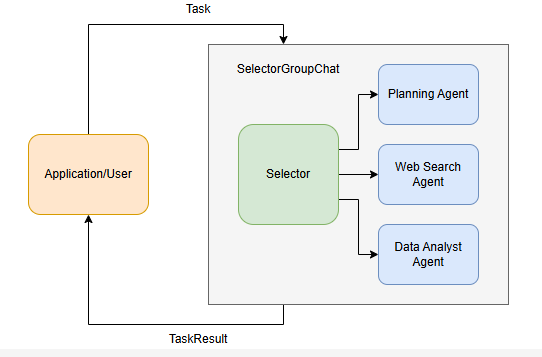
创建一个三个Agent组成的SelectorGroupChat
Planning负责任务规划,Web Search负责调用工具进行信息检索, Data Analyst负责进行数据处理
# Note: This example uses mock tools instead of real APIs for demonstration purposes
def search_web_tool(query: str) -> str:
    if "2006-2007" in query:
        return """Here are the total points scored by Miami Heat players in the 2006-2007 season:
        Udonis Haslem: 844 points
        Dwayne Wade: 1397 points
        James Posey: 550 points
        ...
        """
    elif "2007-2008" in query:
        return "The number of total rebounds for Dwayne Wade in the Miami Heat season 2007-2008 is 214."
    elif "2008-2009" in query:
        return "The number of total rebounds for Dwayne Wade in the Miami Heat season 2008-2009 is 398."
    return "No data found."

def percentage_change_tool(start: float, end: float) -> float:
    return ((end - start) / start) * 100

model_client = OpenAIChatCompletionClient(model="gpt-4o")

planning_agent = AssistantAgent(
    "PlanningAgent",
    description="An agent for planning tasks, this agent should be the first to engage when given a new task.",
    model_client=model_client,
    system_message="""
    You are a planning agent.
    Your job is to break down complex tasks into smaller, manageable subtasks.
    Your team members are:
        WebSearchAgent: Searches for information
        DataAnalystAgent: Performs calculations

    You only plan and delegate tasks - you do not execute them yourself.

    When assigning tasks, use this format:
    1. <agent> : <task>

    After all tasks are complete, summarize the findings and end with "TERMINATE".
    """,
)

web_search_agent = AssistantAgent(
    "WebSearchAgent",
    description="An agent for searching information on the web.",
    tools=[search_web_tool],
    model_client=model_client,
    system_message="""
    You are a web search agent.
    Your only tool is search_tool - use it to find information.
    You make only one search call at a time.
    Once you have the results, you never do calculations based on them.
    """,
)

data_analyst_agent = AssistantAgent(
    "DataAnalystAgent",
    description="An agent for performing calculations.",
    model_client=model_client,
    tools=[percentage_change_tool],
    system_message="""
    You are a data analyst.
    Given the tasks you have been assigned, you should analyze the data and provide results using the tools provided.
    If you have not seen the data, ask for it.
    """,
)
首先定义工具和Agent,主要注意是Agent 的description要描述清晰
- 详细任务由
SelectorGroupChat进行接受,根据代理的描述选择最合适的代理来处理初始任务. - Planning Agent分析任务并将其分解为子任务,使用以下格式将每个子任务分配给最合适的代理:
<agent> : <task> - 根据对话上下文和代理描述,
SelectorGroupChat管理器动态选择下一个代理来处理他们分配的子任务。 - Web Search Agent 一次执行一个搜索,并将结果存储在共享对话历史记录中。
- Data Analyst 将使用可用的计算工具处理收集的信息。
- 工作流来确认任务是否结束
text_mention_termination = TextMentionTermination("TERMINATE")
max_messages_termination = MaxMessageTermination(max_messages=25)
termination = text_mention_termination | max_messages_termination

#选择器的提示词如下
selector_prompt = """Select an agent to perform task.
{roles}
Current conversation context:
{history}
Read the above conversation, then select an agent from {participants} to perform the next task.
Make sure the planner agent has assigned tasks before other agents start working.
Only select one agent.
"""

#创建团队
team = SelectorGroupChat(
    [planning_agent, web_search_agent, data_analyst_agent],
    model_client=model_client,
    termination_condition=termination,
    selector_prompt=selector_prompt,
    allow_repeated_speaker=True,  # Allow an agent to speak multiple turns in a row.
)

task = "Who was the Miami Heat player with the highest points in the 2006-2007 season, and what was the percentage change in his total rebounds between the 2007-2008 and 2008-2009 seasons?"
await Console(team.run_stream(task=task))

task = "Who was the Miami Heat player with the highest points in the 2006-2007 season, and what was the percentage change in his total rebounds between the 2007-2008 and 2008-2009 seasons?"

await Console(team.run_stream(task=task))
然后设置team的停止条件,构建selector的提示词,最终构建Team并执行任务
def selector_func(messages: Sequence[AgentEvent | ChatMessage]) -> str | None:
    if messages[-1].source != planning_agent.name:
        return planning_agent.name
    return None


# Reset the previous team and run the chat again with the selector function.
await team.reset()
team = SelectorGroupChat(
    [planning_agent, web_search_agent, data_analyst_agent],
    model_client=model_client,
    termination_condition=termination,
    selector_prompt=selector_prompt,
    allow_repeated_speaker=True,
    selector_func=selector_func,
)

await Console(team.run_stream(task=task))
很多时候,我们希望更好地控制选择过程。为此,我们可以使用自定义 selector 函数设置 selector_func 参数来覆盖默认的基于模型的选择。这允许我们实现更复杂的选择逻辑和基于状态的过渡。
从自定义选择器函数返回 None 将使用基于模型的默认选择。
user_proxy_agent = UserProxyAgent("UserProxyAgent", description="A proxy for the user to approve or disapprove tasks.")


def selector_func_with_user_proxy(messages: Sequence[AgentEvent | ChatMessage]) -> str | None:
    if messages[-1].source != planning_agent.name and messages[-1].source != user_proxy_agent.name:
        # Planning agent should be the first to engage when given a new task, or check progress.
        return planning_agent.name
    if messages[-1].source == planning_agent.name:
        if messages[-2].source == user_proxy_agent.name and "APPROVE" in messages[-1].content.upper():  # type: ignore
            # User has approved the plan, proceed to the next agent.
            return None
        # Use the user proxy agent to get the user's approval to proceed.
        return user_proxy_agent.name
    if messages[-1].source == user_proxy_agent.name:  #用户参与
        # If the user does not approve, return to the planning agent.
        if "APPROVE" not in messages[-1].content.upper():  # type: ignore #让planning重新规划
            return planning_agent.name
    return None


# Reset the previous agents and run the chat again with the user proxy agent and selector function.
await team.reset()
team = SelectorGroupChat(
    [planning_agent, web_search_agent, data_analyst_agent, user_proxy_agent],
    model_client=model_client,
    termination_condition=termination,
    selector_prompt=selector_prompt,
    selector_func=selector_func_with_user_proxy,
    allow_repeated_speaker=True,
)

await Console(team.run_stream(task=task))
我们可以将 UserProxyAgent 添加到团队中,以便在运行期间提供用户反馈
我们只需将其添加到团队中并更新选择器函数,以便在规划代理发言后始终检查用户反馈。如果用户响应“APPROVE”,则对话将继续,否则,规划代理会再次尝试,直到用户批准为止。
Swarm
Swarm 实现了一个团队,代理可以在其中交接 task 分配给其他代理 ,上文的Agent选择权交给一个集中式的Selector。
原理
- 每个代理都能够生成
HandoffMessage来指示它可以移交给哪些其他代理 - 当团队开始执行任务时,第一个 代理将执行该任务,并就是否移交以及移交给谁做出 决定。
- 当代理生成
HandoffMessage时,接收代理将接管具有相同消息上下文的任务。 - 该过程将继续,直到满足终止条件。
AssistantAgent使用模型的工具调用功能来生成切换。这意味着模型必须支持工具调用。
实践
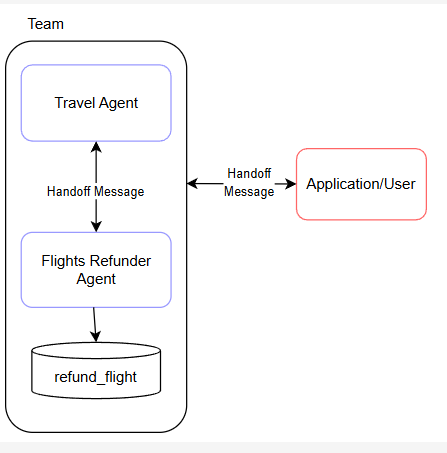
Travel Agent:处理一般旅行和退款协调。
航班退款: 专门使用 refund_flight 工具处理航班退款。
当代理移交给 “user” 时,我们允许用户与代理交互。
- 用户提交请求,首先由Travel Agent进行回答
- 基于用户请求
- 如果是退款相关任务,交给Flights Refunder Agent处理
- 需要客户提供更多信息,任一Agent都可以询问用户
- Flights Refunder会在适当时使用
refund_flight工具处理退款。 - 当用户提供输入时,它会作为
HandoffMessage发送回团队。此消息将定向到最初请求用户输入的代理。
from typing import Any, Dict, List

from autogen_agentchat.agents import AssistantAgent
from autogen_agentchat.conditions import HandoffTermination, TextMentionTermination
from autogen_agentchat.messages import HandoffMessage
from autogen_agentchat.teams import Swarm
from autogen_agentchat.ui import Console
from autogen_ext.models.openai import OpenAIChatCompletionClient

def refund_flight(flight_id: str) -> str:
    """Refund a flight"""
    return f"Flight {flight_id} refunded"
model_client = OpenAIChatCompletionClient(
    model="gpt-4o",
    # api_key="YOUR_API_KEY",
)

travel_agent = AssistantAgent(
    "travel_agent",
    model_client=model_client,
    handoffs=["flights_refunder", "user"],
    system_message="""You are a travel agent.
    The flights_refunder is in charge of refunding flights.
    If you need information from the user, you must first send your message, then you can handoff to the user.
    Use TERMINATE when the travel planning is complete.""",
)

flights_refunder = AssistantAgent(
    "flights_refunder",
    model_client=model_client,
    handoffs=["travel_agent", "user"],
    tools=[refund_flight],
    system_message="""You are an agent specialized in refunding flights.
    You only need flight reference numbers to refund a flight.
    You have the ability to refund a flight using the refund_flight tool.
    If you need information from the user, you must first send your message, then you can handoff to the user.
    When the transaction is complete, handoff to the travel agent to finalize.""",
)
termination = HandoffTermination(target="user") | TextMentionTermination("TERMINATE")
team = Swarm([travel_agent, flights_refunder], termination_condition=termination)

task = "I need to refund my flight."

async def run_team_stream() -> None:
    task_result = await Console(team.run_stream(task=task))
    last_message = task_result.messages[-1]

    while isinstance(last_message, HandoffMessage) and last_message.target == "user":
        user_message = input("User: ")

        task_result = await Console(
            team.run_stream(task=HandoffMessage(source="user", target=last_message.source, content=user_message))
        )
        last_message = task_result.messages[-1]


# Use asyncio.run(...) if you are running this in a script.
await run_team_stream()
实践2 股票研究
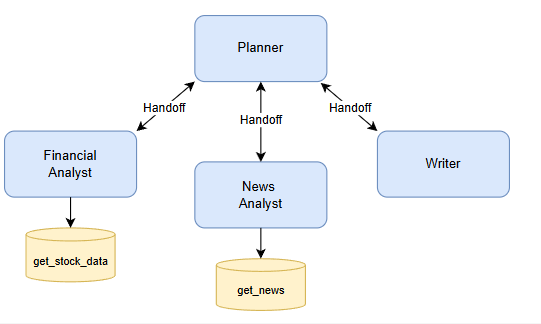
- Planner 中央协调员,根据他们的专业知识将特定任务委派给专业代理。规划师确保每个代理都得到有效利用并监督整个工作流程。
- Financial Analyst(财务分析师):负责使用
get_stock_data等工具分析财务指标和股票数据的专业代理。 - News Analyst(新闻分析师):专注于使用
get_news等工具收集和总结与股票相关的近期新闻文章的代理人。 - Writer(作者): 负责将股票和新闻分析的结果汇编成一个有凝聚力的最终报告的代理人。
async def get_stock_data(symbol: str) -> Dict[str, Any]:
    """Get stock market data for a given symbol"""
    return {"price": 180.25, "volume": 1000000, "pe_ratio": 65.4, "market_cap": "700B"}


async def get_news(query: str) -> List[Dict[str, str]]:
    """Get recent news articles about a company"""
    return [
        {
            "title": "Tesla Expands Cybertruck Production",
            "date": "2024-03-20",
            "summary": "Tesla ramps up Cybertruck manufacturing capacity at Gigafactory Texas, aiming to meet strong demand.",
        },
        {
            "title": "Tesla FSD Beta Shows Promise",
            "date": "2024-03-19",
            "summary": "Latest Full Self-Driving beta demonstrates significant improvements in urban navigation and safety features.",
        },
        {
            "title": "Model Y Dominates Global EV Sales",
            "date": "2024-03-18",
            "summary": "Tesla's Model Y becomes best-selling electric vehicle worldwide, capturing significant market share.",
        },
    ]
model_client = OpenAIChatCompletionClient(
    model="gpt-4o",
    # api_key="YOUR_API_KEY",
)

planner = AssistantAgent(
    "planner",
    model_client=model_client,
    handoffs=["financial_analyst", "news_analyst", "writer"],
    system_message="""You are a research planning coordinator.
    Coordinate market research by delegating to specialized agents:
    - Financial Analyst: For stock data analysis
    - News Analyst: For news gathering and analysis
    - Writer: For compiling final report
    Always send your plan first, then handoff to appropriate agent.
    Always handoff to a single agent at a time.
    Use TERMINATE when research is complete.""",
)

financial_analyst = AssistantAgent(
    "financial_analyst",
    model_client=model_client,
    handoffs=["planner"],
    tools=[get_stock_data],
    system_message="""You are a financial analyst.
    Analyze stock market data using the get_stock_data tool.
    Provide insights on financial metrics.
    Always handoff back to planner when analysis is complete.""",
)

news_analyst = AssistantAgent(
    "news_analyst",
    model_client=model_client,
    handoffs=["planner"],
    tools=[get_news],
    system_message="""You are a news analyst.
    Gather and analyze relevant news using the get_news tool.
    Summarize key market insights from news.
    Always handoff back to planner when analysis is complete.""",
)

writer = AssistantAgent(
    "writer",
    model_client=model_client,
    handoffs=["planner"],
    system_message="""You are a financial report writer.
    Compile research findings into clear, concise reports.
    Always handoff back to planner when writing is complete.""",
)
Swarm仍需要一个主力的规划节点用于启动任务,实际去看时,附庸节点并没有的自主能力,比如新闻分析后可以直接转发给Writer的,但是它还是发给了planner,然后planner直接转发给了Writer
Magentic-One
Magentic-One 是一个通用的多代理系统,用于解决跨各种域的开放式 Web 和基于文件的任务。它代表了多代理系统向前迈出的重要一步,在许多代理基准上实现了有竞争力的性能(有关详细信息,请参阅技术报告)。
Magentic-One 的 Orchestrator 代理会创建计划,将任务委派给其他代理,并跟踪目标的进度,并根据需要动态修改计划。
import asyncio
from autogen_ext.models.openai import OpenAIChatCompletionClient
from autogen_agentchat.agents import AssistantAgent
from autogen_agentchat.teams import MagenticOneGroupChat
from autogen_agentchat.ui import Console


async def main() -> None:
    model_client = OpenAIChatCompletionClient(model="gpt-4o")

    assistant = AssistantAgent(
        "Assistant",
        model_client=model_client,
    )
    team = MagenticOneGroupChat([assistant], model_client=model_client)
    await Console(team.run_stream(task="Provide a different proof for Fermat's Last Theorem"))


asyncio.run(main())
引入WebSurferAgent
import asyncio
from autogen_ext.models.openai import OpenAIChatCompletionClient
from autogen_agentchat.teams import MagenticOneGroupChat
from autogen_agentchat.ui import Console
from autogen_ext.agents.web_surfer import MultimodalWebSurfer
# from autogen_ext.agents.file_surfer import FileSurfer
# from autogen_ext.agents.magentic_one import MagenticOneCoderAgent
# from autogen_agentchat.agents import CodeExecutorAgent
# from autogen_ext.code_executors.local import LocalCommandLineCodeExecutor

async def main() -> None:
    model_client = OpenAIChatCompletionClient(model="gpt-4o")

    surfer = MultimodalWebSurfer(
        "WebSurfer",
        model_client=model_client,
    )

    team = MagenticOneGroupChat([surfer], model_client=model_client)
    await Console(team.run_stream(task="What is the UV index in Melbourne today?"))

    # # Note: you can also use  other agents in the team
    # team = MagenticOneGroupChat([surfer, file_surfer, coder, terminal], model_client=model_client)
    # file_surfer = FileSurfer( "FileSurfer",model_client=model_client)
    # coder = MagenticOneCoderAgent("Coder",model_client=model_client)
    # terminal = CodeExecutorAgent("ComputerTerminal",code_executor=LocalCommandLineCodeExecutor())


asyncio.run(main())
或者,将所有代理捆绑在一起的 MagenticOne 帮助程序类一起使用:
import asyncio
from autogen_ext.models.openai import OpenAIChatCompletionClient
from autogen_ext.teams.magentic_one import MagenticOne
from autogen_agentchat.ui import Console

async def example_usage():
    client = OpenAIChatCompletionClient(model="gpt-4o")
    m1 = MagenticOne(client=client)
    task = "Write a Python script to fetch data from an API."
    result = await Console(m1.run_stream(task=task))
    print(result)

if __name__ == "__main__":
    asyncio.run(example_usage())
总体而言,Magentic-One 由以下代理组成:
- 编排器:负责任务分解和规划、指导其他代理执行子任务、跟踪整体进度并根据需要采取纠正措施的首席代理
- WebSurfer:这是一个LLM基于代理,精通命令和管理基于 Chromium 的 Web 浏览器的状态。对于每个传入的请求,WebSurfer 都会在浏览器上执行一个作,然后报告网页的新状态 WebSurfer 的作空间包括导航(例如访问 URL、执行 Web 搜索);网页作(例如,单击和键入);和阅读动作(例如,总结或回答问题)。WebSurfer 依赖于浏览器的可访问性树和提示执行其作的标记集。
- FileSurfer:这是一个基于 LLM的代理,它命令基于 markdown 的文件预览应用程序读取大多数类型的本地文件。FileSurfer 还可以执行常见的导航任务,例如列出目录的内容和导航文件夹结构。
- Coder:这是一个LLM基于代理的代理,通过其系统提示符专门用于编写代码、分析从其他代理收集的信息或创建新工件。
- ComputerTerminal:最后,ComputerTerminal 为团队提供了对控制台 shell 的访问,Coder 的程序可以在其中执行,并且可以安装新的编程库。
Memory
AgentChat 提供了一个 Memory 协议,该协议可以扩展以提供此功能。主要方法包括 query、update_context、add、clear 和 close。
add: add new entries to the memory storequery: retrieve relevant information from the memory storeupdate_context: mutate an agent’s internalmodel_contextby adding the retrieved information (used in theAssistantAgentclass)clear: clear all entries from the memory storeclose: clean up any resources used by the memory store
ListMemory
。这是一个简单的基于列表的内存实现,按时间顺序维护内存,并将最近的Memory附加到模型的上下文中。
from autogen_agentchat.agents import AssistantAgent
from autogen_agentchat.ui import Console
from autogen_core.memory import ListMemory, MemoryContent, MemoryMimeType
from autogen_ext.models.openai import OpenAIChatCompletionClient


# Initialize user memory
user_memory = ListMemory()

# Add user preferences to memory
await user_memory.add(MemoryContent(content="The weather should be in metric units", mime_type=MemoryMimeType.TEXT))

await user_memory.add(MemoryContent(content="Meal recipe must be vegan", mime_type=MemoryMimeType.TEXT))


async def get_weather(city: str, units: str = "imperial") -> str:
    if units == "imperial":
        return f"The weather in {city} is 73 °F and Sunny."
    elif units == "metric":
        return f"The weather in {city} is 23 °C and Sunny."
    else:
        return f"Sorry, I don't know the weather in {city}."


assistant_agent = AssistantAgent(
    name="assistant_agent",
    model_client=OpenAIChatCompletionClient(
        model="gpt-4o-2024-08-06",
    ),
    tools=[get_weather],
    memory=[user_memory],
)

# Run the agent with a task.
stream = assistant_agent.run_stream(task="What is the weather in New York?")
await Console(stream)
从目前来看, Memory类似一个外挂的知识,大模型对其的使用方式是放到system Message中。
Custom Memory Stores (Vector DBs, etc.)
autogen_ext.memory.chromadb.ChromaDBVectorMemory:使用矢量数据库存储和检索信息的内存存储。
import os
from pathlib import Path

from autogen_agentchat.agents import AssistantAgent
from autogen_agentchat.ui import Console
from autogen_core.memory import MemoryContent, MemoryMimeType
from autogen_ext.memory.chromadb import ChromaDBVectorMemory, PersistentChromaDBVectorMemoryConfig
from autogen_ext.models.openai import OpenAIChatCompletionClient

# Initialize ChromaDB memory with custom config
chroma_user_memory = ChromaDBVectorMemory(
    config=PersistentChromaDBVectorMemoryConfig(
        collection_name="preferences",
        persistence_path=os.path.join(str(Path.home()), ".chromadb_autogen"),
        k=2,  # Return top  k results
        score_threshold=0.4,  # Minimum similarity score
    )
)
# a HttpChromaDBVectorMemoryConfig is also supported for connecting to a remote ChromaDB server

# Add user preferences to memory
await chroma_user_memory.add(
    MemoryContent(
        content="The weather should be in metric units",
        mime_type=MemoryMimeType.TEXT,
        metadata={"category": "preferences", "type": "units"},
    )
)

await chroma_user_memory.add(
    MemoryContent(
        content="Meal recipe must be vegan",
        mime_type=MemoryMimeType.TEXT,
        metadata={"category": "preferences", "type": "dietary"},
    )
)


# Create assistant agent with ChromaDB memory
assistant_agent = AssistantAgent(
    name="assistant_agent",
    model_client=OpenAIChatCompletionClient(
        model="gpt-4o",
    ),
    tools=[get_weather],
    memory=[user_memory],
)

stream = assistant_agent.run_stream(task="What is the weather in New York?")
await Console(stream)

await user_memory.close()
组件导出
AutoGen 提供了一个 Component 配置类,它定义了将组件序列化 / 反序列化为声明式规范的行为。我们可以通过分别调用 .dump_component() 和 .load_component() 来实现这一点。这对于调试、可视化甚至与他人共享您的工作非常有用。在此笔记本中,我们将演示如何将多个组件序列化为声明性规范(如 JSON 文件)。
导出.dump_component()
JSON格式输出 model_dump_json()
导入 load_component(or_term_config)
总结
Autogen是一款Agent框架,作者后续将其进一步封装,有了agentchat框架
有两个重要的库 autogen_agentchat 和 autogen_ext
- autogen_agentchat实现了auotochat
- autogen_ext 拓展库,可以由社区共同维护
Client
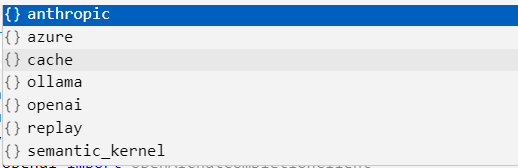
Agent需要LLM的支持, 我们将其称为client,client为Agent提供底层的模型, 可以使用autogen_ext.models.openai 的 OpenAIChatCompletionClient 来使用openai的模型,还支持ollama ,claude等模型作为client
Agent
- agentchat 自带的Agent有 “BaseChatAgent”,”AssistantAgent”,”CodeExecutorAgent”,”SocietyOfMindAgent”,”UserProxyAgent”,
- 拓展中的Agent 有 file_surfer . video_surfer . web_surfer
- 创建一个 Agent 需要传入 client作为底层模型, name作为Agent的名字,可选的参数有 Tool, systemMessage …
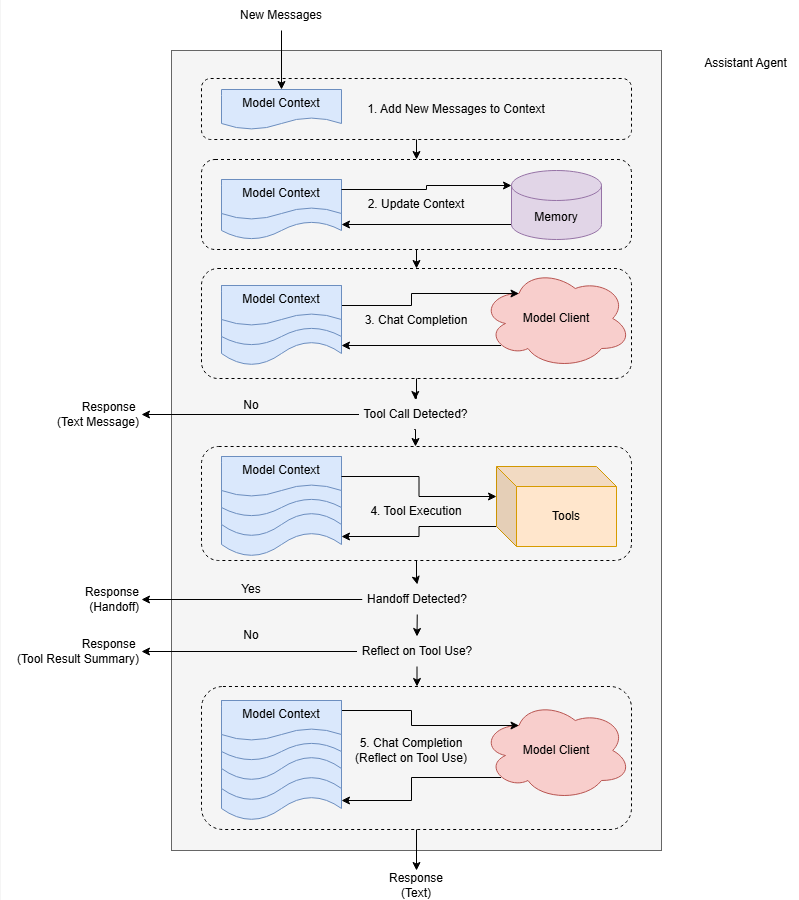
- Agent有三部分消息: 输入(Input or Context) , 内部消息(Event) , 输出(Response)
- 如果调用了工具,默认情况下,Agent将返回工具调用的结果作为最终响应,可以通过设置
reflect_on_tool_use让Agent进行进一步处理 - autogen是一个多agent框架,每一个Agent每次只处理一个Message
Message
- 总体来说消息可以分为两类 :Agent之间的消息 与 Agent内部的消息
- Agent之间的消息为多种ChatMessage, 支持多模态的消息 TextMessage | MultiModalMessage | StopMessage | ToolCallSummaryMessage | HandoffMessage
- Agent内部消息称为AgentEvent: ToolCallRequestEvent | ToolCallExecutionEvent | MemoryQueryEvent | UserInputRequestedEvent | ModelClientStreamingChunkEvent | ThoughtEvent,
- AMessage作为Agent沟通交流的载体
Team
- Team的类型有,”BaseGroupChat”,”RoundRobinGroupChat”,”SelectorGroupChat”,”Swarm”,”MagenticOneGroupChat”
- 每一种Team类型代表一种多智能体协作方式,RoundRobinGroupChat 是Agent按照顺序进行消息处理,SelectorGroup顾名思义有一个主Agent用于决定哪个,Swarms类型的Agent可以自主决定下一个任务执行人。
Terminiation
- 团队中的Agent有决定下一个是谁的方式,而停止任务协作需要我们外部进行干预
- 每当一个Agent给出Response后, 调用终止条件对自上一次终止以来的消息进行检查,若匹配到终止条件,则终止本次运行。
- 终止条件有很多种、Token数量、消息数量…
- 终止条件可以自定义检查的逻辑
Humain in the Loop
- 用户可以参与到协作中,可以在团队中创建一个UserProxyAgent在运行中参与,也可以在团队运行一次终止后参与。
文章参考:
博客地址: qwrdxer.github.io
欢迎交流: qq1944270374
转载请注明来源,欢迎对文章中的引用来源进行考证,欢迎指出任何有错误或不够清晰的表达。可以在下面评论区评论,也可以邮件至 1944270374@qq.com